AI agents have quietly transitioned from experiments to real-world production systems. They are now being used to review code, automate workflows, monitor systems, and execute multi-step tasks across teams. This shift is already visible in how modern software is being built and deployed.
That momentum is not anecdotal. According to Gartner, by 2026, around 40% of enterprise applications are expected to embed task-specific AI agents, up from a small fraction today. This suggests a structural shift in software rather than a fleeting trend.
At the same time, new terms have started appearing everywhere - AI agents, agentic AI, and autonomous agents. They are often used interchangeably and sometimes loosely. This has made it harder to understand what actually qualifies as an AI agent and what does not.
The real shift is architectural. We are moving from AI systems that generate a single response to systems that can observe inputs, reason over them, and take actions repeatedly over time. That difference is what enables autonomy.
This guide is a practical introduction to AI agents. It explains what they are, how they work, the main types you’ll encounter, and where they are used today, before ending with a simple agent you can build and run yourself.
What Are AI Agents?
An AI agent is a system built to achieve a goal by continuously perceiving information, reasoning about it, and taking actions. Unlike single-prompt AI interactions, an agent operates across multiple steps and adapts its behavior based on context.
In practice, an AI agent works in a loop. It observes inputs such as user requests, system events, or external data. It then decides what to do next and executes that decision using tools, APIs, or workflows. This process continues until the task is completed or the agent is stopped.
A large language model by itself is not an agent. Language models generate responses to prompts, but they do not manage goals or take actions independently. In an agent system, the model supports reasoning, while the surrounding logic controls decisions and execution.
Chatbots are also different from agents. A chatbot waits for user input and responds. An AI agent can continue operating without constant prompts and can trigger real-world effects such as updating files, calling services, or coordinating tasks.
The terms AI agents, agents, and agentic AI are commonly used to describe these systems. They all refer to the same core idea: software that combines reasoning with the ability to act towards a goal.
The 3 Core Components of an AI Agent
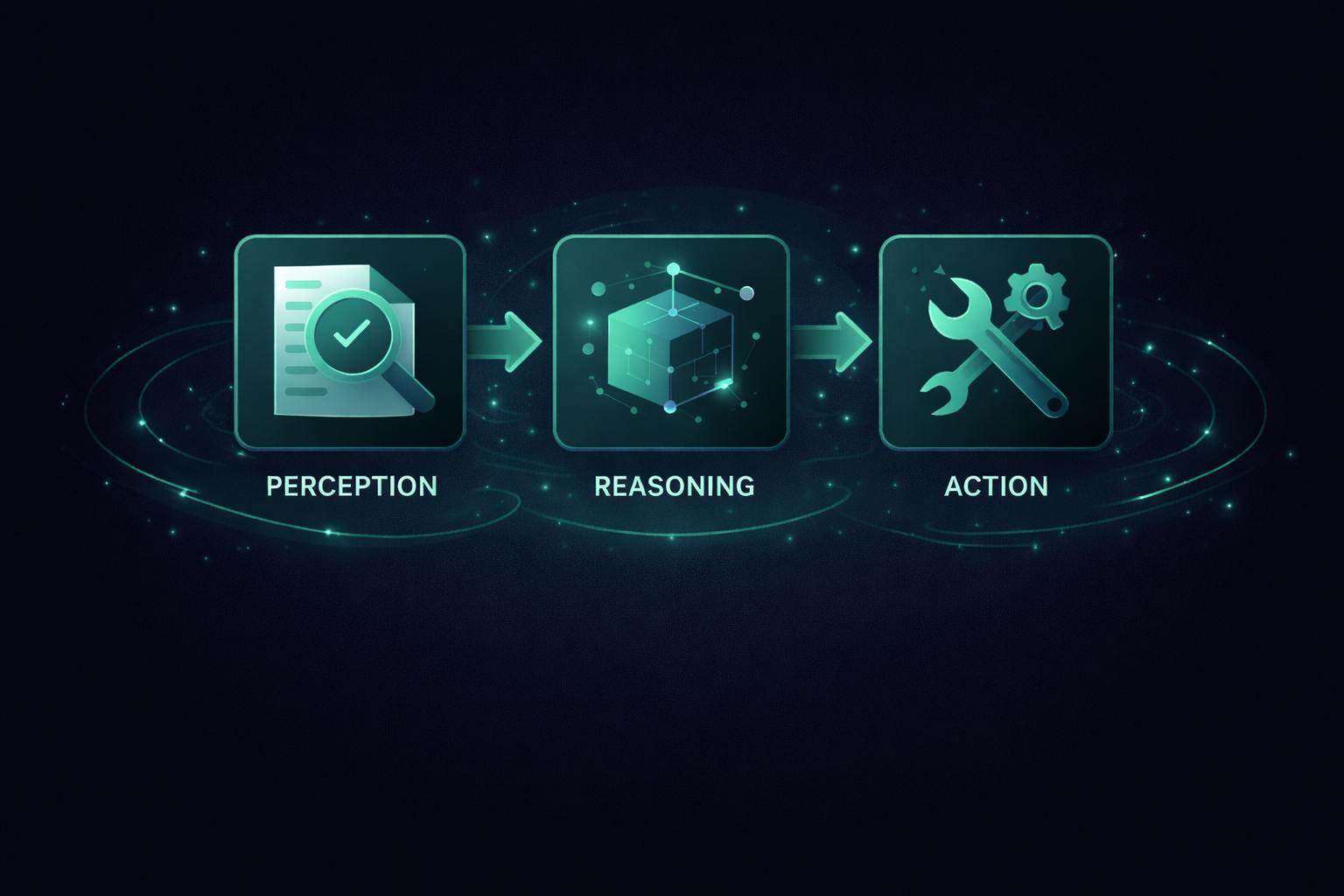
How AI Agents Work: Perception → Reasoning → Action
Every AI agent follows the same fundamental loop. It perceives information, reasons about what that information means, and then takes an action. This cycle repeats until the task is complete.
Perception
Perception is how an agent receives information from its environment. This can include user input, files, API responses, logs, system events, or messages from other agents. The quality and relevance of these inputs directly affect the agent’s decisions.
Reasoning
Reasoning is where decisions are made. The agent evaluates the current context, considers its goal, and determines the next step. This may involve planning multiple actions, recalling past context, or deciding which tool to use. Language models typically power this part of the system.
Action
Action is how the agent affects its environment. This can include calling APIs, modifying files, running commands, triggering workflows, or sending messages. Actions produce new signals, which feed back into the next perception step.
This loop is what gives agents their sense of autonomy. They are not limited to a single response. They observe outcomes, adjust decisions, and continue acting until the objective is reached.
Types of AI Agents
AI agents can be grouped based on how they reason, act, and interact with the world. These categories are not rigid, but they help clarify how different agent systems are designed and used.
3.1 Cognitive / Decision Agents
Cognitive agents focus on decision-making. They evaluate inputs, assess possible outcomes, and choose the next action based on logic, learned behavior, or plans.
- Reactive agents respond immediately to inputs without long-term planning.
- Learning agents improve decisions over time based on feedback or outcomes.
- Planning agents reason across multiple steps before acting.
Examples
- Code review agents that analyze pull requests and suggest improvements
- Bug triage agents that prioritize issues based on severity and context
3.2 Execution Agents
Execution agents are designed to perform tasks. They emphasize tool usage and action over deep reasoning, often operating within clearly defined boundaries.
- Tool-using agents invoke APIs, scripts, or services to complete tasks
- Vertical agents are specialized for a narrow domain or workflow
- Utility-based agents optimize for speed, cost, or reliability
Examples
- An agent that fixes formatting or lint errors in GitHub pull requests
- A data cleanup agent that standardizes and validates incoming records
3.3 Embodied Agents
Embodied agents interact with the physical world. They combine perception from sensors with decision-making and physical actions.
Examples
- Warehouse robots that navigate and move inventory
- Autonomous inspection drones used for infrastructure monitoring
3.4 Interaction Agents
Interaction agents are designed to communicate with humans. They focus on dialogue, assistance, and collaboration rather than autonomous task execution.
- Conversational agents engage through natural language
- Assistive agents support users with contextual help or guidance
Examples
- Customer support agents handling routine queries
- Internal helpdesk agents assisting employees with tools and processes
Real-World Use Cases of AI Agents
AI agents are most valuable when embedded into real workflows where they observe context, make decisions, and take actions over multiple steps. The following examples reflect how agentic AI is already being used in practice today.
4.1 Developer Use Cases
In software engineering, agentic assistance has moved from experimental to widespread adoption. AI-assisted development is no longer niche. The 2025 Stack Overflow Developer Survey reports that over 80% of developers use ChatGPT, while nearly 68% rely on GitHub Copilot.
Modern AI-assisted IDEs like Cursor allow developers to assign autonomous tasks from code refactoring to issue resolution, that span multiple steps and multiple files. Code review agents integrated into platforms such as GitHub scan pull requests, detect potential bugs, suggest improvements, and help teams keep up with rapid deployment cycles.
Testing agents automate not just test generation but end-to-end validation workflows, running tests, analyzing results, and reporting back to developers. These agentic systems reduce manual effort and help maintain quality in fast-moving development environments.
4.2 Automation & Workflow Use Cases
In workflow automation, AI agents go beyond simple rule-based triggers. Platforms like n8n and Zapier are adopting AI-driven steps that interpret inputs contextually and decide what action to take next, rather than always following a fixed rule. Agents can adapt workflows dynamically based on intermediate outcomes.
In more advanced orchestration setups, multiple agents can work together. One agent may gather data, another validate it, and a third take action based on the combined result. Designing and operating these systems often requires AI engineering expertise that spans agent orchestration, system integration, and reliability, especially in enterprise environments.
4.3 Ops & Monitoring Use Cases
Operations teams handle large volumes of logs, metrics, and alerts, making them well-suited for agent-based systems. Monitoring agents can observe signals, detect anomalies, and summarize incidents, rather than presenting raw data.
In practice, agents often sit on top of observability tools like Datadog, New Relic, or Elastic, highlighting what changed and why it matters. During incidents, they can pull context from platforms such as PagerDuty or Opsgenie, correlate related events, and automatically maintain incident timelines.
Some teams also connect agents to runbooks and remediation workflows, allowing them to recommend or trigger actions like service restarts or scaling. Even with humans in the loop, these agents reduce alert fatigue and speed up response times.
Industries Using AI Agents Today
AI agents are already moving beyond labs and prototypes. Organizations across sectors are deploying them to handle complex tasks, helping professionals make better decisions, automate multi-step workflows, and access information more efficiently. Below are real instances where AI agents are in use today.
A. Knowledge & Decision Industries
Healthcare
AI agents are being used to assist clinical teams with documentation and patient coordination. Companies like Grove AI have built agents such as Grace, which can pre-screen patients for clinical trials, schedule transportation, and help coordinate follow-up care, reducing administrative burden on clinical researchers.
Finance
In financial services, agentic systems are used for monitoring and decision support. Agents continuously observe market data, internal signals, and risk indicators, then surface insights or trigger actions such as alerts, reviews, or escalations. Unlike document automation, these agents operate over time and adapt as conditions change.
Legal & Compliance
In the legal industry, AI agents are used to streamline complex, context-rich workflows that once required significant manual effort. For example, platforms like Harvey AI provide agentic workflows that assist legal professionals with drafting documents, reviewing contracts, conducting research across large knowledge bases, and synthesizing insights, while more broadly enabling multi-step legal and compliance processes that track context, apply domain rules, and guide actions such as escalation or revision without relying on brittle, rule-heavy automation.
Education
AI agents are being explored in adaptive learning systems that customize content and feedback based on individual student progress. Beyond personalization, these agents can track learning patterns over time, identify where students struggle, and recommend targeted interventions or next steps. This helps educators scale meaningful support across large groups without reducing learning to static, one-size-fits-all content.
B. Physical & Operational Industries
Manufacturing & Maintenance
AI agents are used to analyze equipment data and estimate maintenance needs, allowing teams to predict failures and schedule work before breakdowns occur. Enterprise platforms list maintenance, estimation, and production planning among the top agent use cases in manufacturing firms.
Logistics & Supply Chain
In logistics, coordinated agents can optimize delivery routes, manage inventory updates, and reprioritize tasks in real time across warehouses and shipment networks, helping operations stay flexible amid disruptions.
Automation Platforms
Workflow platforms like n8n provide AI agent integrations that connect to hundreds of apps and services, turning multi-step operations, such as data ingestion, transformation, and action triggers, into automated agentic flows.
C. Consumer & Business Services
Software Development
Major developer platforms are building agentic tooling into their ecosystems. For example, GitHub’s “Agent HQ” lets developers coordinate and manage multiple coding agents from within the GitHub interface, enabling autonomous coding tasks, code review, and planning across tools such as OpenAI’s Codex and other third-party agents.
Sales & Business Development
Emerging platforms like Artisan AI use AI agents as digital workers, such as automated BDRs that source leads, sequence personalized outreach, and schedule meetings, effectively acting as agentic assistants for sales teams.
Human Resources & Employee Experience
AI agents are assisting with job postings, interview scheduling, and onboarding by automating routine HR workflows such as communications and task coordination. Enterprise systems increasingly embed such functionality directly into workflows.
Build a Simple AI Agent (Hands-On)
To make the concept concrete, here’s a minimal AI agent you can run locally. It chats with you in the terminal and maintains conversation memory, so it can respond with context across turns.
What this agent demonstrates
- Perception: reads your terminal input
- Reasoning: calls an LLM to decide what to say
- Action: prints a reply (and stores it back into memory)
Setup
- Create a folder and initialize a Node project:
mkdir simple-agent && cd simple-agent
npm init -y- Install the OpenAI SDK:
npm install openai- Set your API key:
export OPENAI_API_KEY="your_api_key"- Create a file named
agent.jsand paste the code below.
Code
// agent.js
// A very simple AI agent that chats with you in the terminal.
//
// Setup:
// 1. npm install openai
// 2. export OPENAI_API_KEY="your_api_key"
// 3. node agent.js

import OpenAI from "openai";
import readline from "node:readline/promises";
import { stdin as input, stdout as output } from "node:process";

const client = new OpenAI({
  apiKey: process.env.OPENAI_API_KEY,
});

async function main() {
  const rl = readline.createInterface({ input, output });

  console.log("🤖 Simple AI Agent");
  console.log('Type "exit" to quit.\n');

  // Agent's memory of the conversation
  const messages = [
    {
      role: "system",
      content:
        "You are a helpful AI agent. Be concise, clear, and conversational.",
    },
  ];

  while (true) {
    const userInput = await rl.question("You: ");

    if (userInput.trim().toLowerCase() === "exit") {
      console.log("Agent: Bye! 👋");
      break;
    }

    messages.push({ role: "user", content: userInput });

    // Call the model
    const completion = await client.chat.completions.create({
      model: "gpt-4.1-mini", // or any available chat model
      messages,
    });

    const reply = completion.choices[0]?.message?.content?.trim() || "";
    console.log("Agent:", reply, "\n");

    messages.push({ role: "assistant", content: reply });
  }

  rl.close();
}

main().catch((err) => {
  console.error("Error running agent:", err);
});
Run it
node agent.js
You now have a working baseline agent. It’s simple, but it captures the core loop that more advanced agents build on: input → reasoning → action → memory → repeat.
Why AI Agents Are Booming Now
The rise of AI agents is not just a model upgrade. It’s a workflow upgrade.
Teams have always had too much to do: reviews pile up, ticket backlog, ops alerts flood, and routine coordination steals time from real problem-solving. What agents change is the ability to delegate chunks of work, not just ask questions and copy answers.
Agents also fit the direction the software is already moving toward. Tools are becoming more integrated. Work is increasingly API-driven. Once an agent can read context and take actions safely, it stops being a “chat feature” and starts behaving like a teammate inside your systems.
Another reason agents are taking off is parallelism. Instead of doing tasks one by one, teams can spin up multiple agents for subtasks - review, test, summarize, draft, validate, and merge the results. That changes throughput without changing headcount.
The practical takeaway is simple: start small. Pick one workflow that is repetitive, messy, and time-consuming. Give an agent clear boundaries and a narrow goal. Measure whether it reduces cycle time or manual coordination. If it does, expand gradually.
AI agents are not magic. But in the right workflows, they are quickly becoming the default way software gets work done.
If you found this post valuable, I'd love to hear your thoughts. Let's connect and continue the conversation on LinkedIn
Aniket Singh
SDE2
Aniket Singh is an SDE II at Procedure, working across Web2, Web3, and AI-driven systems. He has experience building and owning features across the frontend, backend, and cloud, collaborating with startups and global stakeholders.
-for-smarter-ai-systems-cover-f9d52c28.png)