“Would you hand the keys of the vault to everyone in the company?”
Every digital system faces the same dilemma. Without a way to control who can do what, even simple platforms can turn chaotic, wrong data gets edited, critical actions get triggered, and accountability disappears.
That’s exactly why Role-Based Access Control (RBAC) exists. RBAC assigns permissions based on roles, like Admin, Manager, or Viewer, so users only access what they’re meant to. It’s a simple security model, but it powers banks, dashboards, SaaS products, and internal tools everywhere.
At its simplest, RBAC answers three questions: Who is the user? What role do they have? What actions should that role be allowed to perform? And that clarity is what keeps modern systems predictable, safe, and secure.
Why RBAC Matters: The Risks of Not Having Access Control
When a system doesn’t enforce clear access boundaries, it becomes vulnerable to accidental misuse and intentional overreach. Anyone could edit critical records, delete important data, or trigger operations meant only for administrators. That’s the exact problem RBAC solves: it introduces structure and predictability into how actions are granted.
In real systems, this risk is not hypothetical. Several major security incidents have been linked to overly permissive roles and poorly enforced access boundaries. For example, the Capital One breach (2019) exposed data of over 100 million customers after an attacker exploited a role that had far broader permissions than required. In such cases, RBAC existed in name, but weak role definitions and a lack of enforcement turned a single access point into a large-scale failure.
The consequences are clear: unauthorised changes, compliance failures, data exposure, and a complete lack of traceability. RBAC prevents this by defining who can do what and enforcing that logic across the system. With clear roles and permissions, platforms remain secure, auditable, and easier to scale as more users and teams join.
Core RBAC Principles
Before diving into models and implementation, RBAC principles help to understand the foundational building blocks of RBAC. At its core, every RBAC system revolves around three simple concepts:
Users, Roles, and Permissions
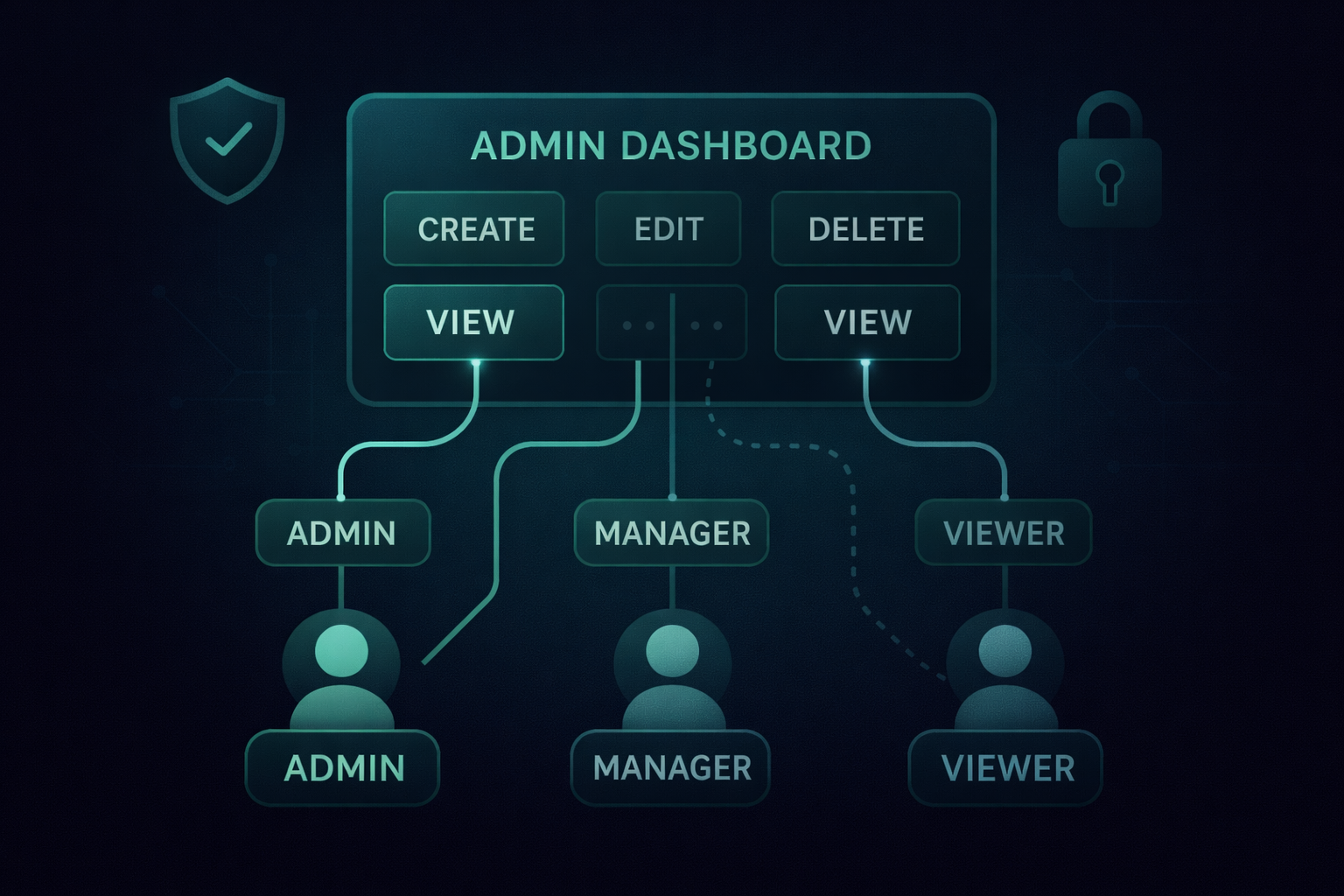
Users represent the individuals in the system, roles define the level of authority they hold (like Admin, Manager, Viewer), and permissions define the specific actions those roles can take, such as create, edit, delete, or view resources. RBAC works by mapping these elements cleanly so the system always knows what each role is allowed to do.
Role Hierarchies
In many organisations, access isn’t flat. A Manager might need everything a Viewer has plus a bit more; an Admin might require everything a Manager can do. Hierarchical RBAC captures this structure by allowing higher roles to inherit permissions from lower ones, mirroring how real companies operate.
Least Privilege & Separation of Duties
RBAC encourages giving users only the access they genuinely need, nothing more. This “least privilege” approach reduces accidental damage and limits the blast radius of mistakes. Alongside this, separation of duties ensures that no single user holds conflicting powers, improving safety and reducing internal risks.
Together, these RBAC principles form a predictable, scalable access control foundation that teams can rely on as the system grows in complexity.
RBAC Models: Flat, Hierarchical, and How ABAC Compares
With the core principles in place, the next step is understanding how RBAC structures access in real systems. RBAC can be implemented in different ways depending on how mature the product is and how complex the permission model needs to be. Most teams start with a simple approach and evolve as the system grows. Here are the most common models used today.
Flat RBAC (Basic Model)
The simplest form of role-based access control: each role is directly assigned a set of permissions.
Example:
- Viewer → view only
- Editor → view + edit
- Admin → full control
This works well for small teams or products, but becomes harder to manage as the number of roles expands.
Hierarchical RBAC
In many organizations, access naturally stacks. Managers need everything a Viewer can do, and Admins need everything Managers can do. Hierarchical RBAC captures this structure by allowing permission inheritance, reducing duplication, and mirroring real organizational behavior.
How ABAC Fits In (Attribute-Based Access Control)
While RBAC assigns permissions based on roles, ABAC evaluates attributes, like department, resource type, or user metadata.
Example: Only users from the Finance department can access financial resources, regardless of their role.
ABAC offers finer-grained control, but with more complexity. In most systems, RBAC remains the foundation, and ABAC is added selectively when contextual rules are required.
Where RBAC Is Used: Real-World Examples
Once the models are clear, it's easier to see how RBAC appears in real-world platforms. RBAC shows up in almost every product that needs predictable, auditable control over user actions. Whether it’s a financial dashboard or an internal workflow tool, assigning permissions through roles keeps operations safe and structured.
Banking and Financial Platforms
Banks deal with sensitive data, audit requirements, and strict compliance workflows. A real example is a digital banking platform that needed RBAC to ensure that relationship managers, operations teams, and auditors each had the exact level of access required, nothing more. Here, RBAC prevents unauthorized edits, flags potential misuse, and keeps the system ready for third-party audits.
CA and Professional Services Platforms
In platforms used by Chartered Accountants or similar professional teams, access varies significantly by employee type.
- A main CA might have full admin rights to add or remove users.
- Junior staff may only view records.
- Reviewers may edit but not delete.
RBAC helps maintain this structured workflow without hard-coding permissions for every individual.
Internal Dashboards and SaaS Tools
Many dashboards separate users into viewers, editors, and admins. Editors can update dashboards, while viewers see only read-only data. Buttons like “Create New Report” or “Delete Entry” automatically disappear or are disabled for users without the right role, making the UI safer and less error-prone.
Across industries, RBAC keeps platforms compliant, predictable, and easier to scale as teams and permissions grow.
How RBAC Works: High-Level Architecture
At a system level, RBAC works by consistently mapping users → roles → permissions, and enforcing that mapping across both the backend and the user interface - a pattern commonly designed during backend architecture and access control planning. The backend acts as the source of truth, while the frontend adjusts the experience based on the user’s permitted actions.
The RBAC Matrix
Most implementations begin with a simple matrix that defines which role can perform which action.
For example:
- Admin → create, edit, delete, approve
- Manager → edit, approve
- Viewer → read-only
This matrix becomes the foundation for both backend validation and interface behavior.
Role Information in Tokens (JWT / OAuth)
In authenticated systems, a user’s role is often embedded inside an access token, such as a JWT or tokens issued by providers like Okta or Clerk. When a user logs in, the token carries information about their identity and role, allowing the backend to determine whether the requested action is allowed.
Backend Enforcement
Every sensitive operation, like creating, editing, or deleting data, passes through a backend check. The server reads the user’s role from the token, evaluates the permissions, and either processes or rejects the request with a 403, unauthorized error. This prevents users from bypassing UI restrictions by calling APIs directly.
Frontend Enforcement
On the UI side, RBAC ensures that users only see what they’re allowed to act on. If a user has a viewer role, action buttons like “Delete”, “Create New”, or “Modify Settings” disappear or remain disabled with a tooltip that actions can't be performed by this user. This improves usability and reduces accidental misuse.
Together, these components create an RBAC flow that is predictable, secure, and consistent across every layer of the application.
Implementing RBAC on the Frontend
On the frontend, RBAC ensures users only see the actions they’re allowed to take - an approach commonly used in large-scale frontend systems to reduce errors and improve UX. This not only tightens security but also creates a cleaner, safer interface where buttons, forms, and navigation options adjust automatically based on the user’s role.
Defining a Role - Permission Map
A common approach is to maintain a configuration object that maps each role to the actions it can perform.
const rbacConfig = {
  resource:{
role:{
action1:false
actions2:true
}
}
}
This structure keeps permissions transparent and easy to audit.
A Custom Hook to Check Access
A hook like useRBAC makes it simple for components to ask: Can this user perform this action on this resource?
export const useRBAC = (role) => {
  const hasAccess = (resource, action) => {
    return rbacConfig[resource][role][action];
  };

  return { hasAccess };
};
If the backend sends the user’s role during authentication, the UI can apply RBAC checks everywhere: disabling action buttons, hiding menus, and preventing navigation where appropriate.
Backend as the Source of Truth
In larger systems, the backend often sends the full permission JSON to the frontend, ensuring that UI behavior always matches server-side RBAC rules. This keeps permissions consistent across services and avoids mismatches between UI and API behavior.
Frontend RBAC doesn’t replace backend validation, but it significantly improves usability and reduces error-prone interactions for users with limited permissions.
Implementing RBAC on the Backend
Backend enforcement is the backbone of any RBAC system. Even if the UI hides certain actions, users can still attempt to call APIs directly, so the backend must validate every sensitive request based on the user’s role. This ensures that access control cannot be bypassed.
Middleware for Critical Operations
A common pattern is to add middleware that sits in front of routes handling create, edit, delete, or approval actions.
This middleware checks:
- Which user is making the request?
- What role do they have?
- Does that role have permission to perform this action?
Only if the role is authorized does the request continue to the controller.
Handling POST-as-GET Patterns
Some systems use POST requests for read operations (pagination, filters, large payloads). In these cases, a whitelist of “safe” routes is maintained so the RBAC middleware doesn’t mistakenly block legitimate read calls. This avoids breaking APIs that use non-traditional HTTP methods.
Integration with Authentication Providers
Whether using JWT, OAuth, Okta, Clerk, or another identity provider, the user’s role typically travels inside the access token. The backend extracts this role and cross-checks it against the permission map. This keeps authentication and authorization cleanly separated:
- Authentication → who the user is
Authorization → what the user is allowed to do
Consistent Enforcement Across Services
If the platform uses multiple microservices, each service should apply the same RBAC rules. This can be done by sharing a permission map, storing permissions centrally, or sending permissions via backend responses so each service evaluates access reliably.
Backend RBAC ensures that no matter what the UI shows, unauthorized users cannot perform unauthorized actions, a fundamental requirement for secure, auditable systems.
Dynamic Role Management (Admin Panel + Runtime Changes)
RBAC isn’t static. As teams grow and responsibilities shift, user roles often need to change in real time. A well-designed RBAC system makes this process seamless by allowing administrators to update roles through an internal settings or users page, without requiring code changes or redeployments.
Admin-Controlled Role Updates
Platforms typically offer an admin panel where authorized users can modify a person’s role (e.g., switching someone from Viewer → Editor). Once the role changes, the new permissions immediately apply across both the backend and the UI.
This ensures that access changes propagate quickly and reliably without manual intervention.
Instant Permission Adjustments in the UI
When a user’s role changes, the frontend reflects the update during the next session or token refresh.
For example:
- A viewer promoted to editor suddenly gains access to “Create New” or “Edit” actions.
- A demoted user sees buttons disabled or removed entirely.
This dynamic behavior keeps the interface aligned with the backend’s access rules.
Why Single-Role Models Keep Things Predictable
While some systems experiment with assigning multiple roles to the same user, it often introduces conflict and complexity. Many teams intentionally adopt a single-role-per-user approach to keep permissions straightforward and avoid overlapping access paths.
If a product later needs multi-role support, it can be introduced carefully with clear conflict-resolution rules.
Dynamic role management ensures RBAC stays flexible, manageable, and scalable as the organization evolves.
RBAC Edge Cases & Best Practices
Keeping RBAC policies simple and role-driven helps teams avoid confusion as the system scales. Even with a well-structured RBAC system, certain scenarios require additional care. These edge cases are common in growing products, and handling them correctly keeps access control predictable and secure.
Avoiding Conflicting Permissions
Assigning multiple roles to a single user can introduce ambiguity. What happens if one role allows deletion while another doesn’t? Many teams avoid this by granting one role per user, ensuring a clear and conflict-free permission path. If multi-role support is needed later, it should come with explicit rules for resolving overlaps.
Using Least Privilege by Default
RBAC works best when users start with minimal permissions and gain access only as needed. This reduces the chances of accidental changes, data exposure, or overreach. New roles should be designed with a focus on what the user must do, not everything they might do.
Keeping a Single Source of Truth
Whether the permissions are stored in a database, a configuration file, or sent from the backend as JSON, RBAC should have one authoritative source. This prevents the frontend, backend, and microservices from drifting into inconsistent states.
Auditability and Logging
RBAC becomes far more powerful when paired with good logging. Tracking which user performed which action, and when, helps detect misuse, supports compliance checks, and makes troubleshooting far easier.
Graceful Degradation in the UI
When a user lacks access to an action, the interface should clearly reflect that. Disabled buttons, hidden options, or informative tooltips help users understand their access level without confusion or accidental attempts.
These best practices keep RBAC predictable, safer to operate, and easier to evolve as the platform grows in complexity.
Conclusion
RBAC provides a simple but powerful way to control who can do what inside a system. By defining clear roles, mapping them to permissions, and enforcing those rules across both the backend and the UI, teams gain a framework that is secure, predictable, and easy to manage as the product evolves.
From financial platforms to internal dashboards, RBAC helps prevent unauthorized actions, supports audits, and reduces the risk of accidental misuse. When implemented with strong principles, least privilege, clean hierarchies, dynamic role updates, and consistent backend enforcement, it becomes one of the most reliable foundations for secure access control.
For any growing product, RBAC isn’t just a convenience; it’s a must-have layer of protection that keeps systems safe, compliant, and ready to scale.
If you found this post valuable, I’d love to hear your thoughts. Let’s connect and continue the conversation on LinkedIn.
Aniket Singh
SDE2
Aniket Singh is an SDE II at Procedure, working across Web2, Web3, and AI-driven systems. He has experience building and owning features across the frontend, backend, and cloud, collaborating with startups and global stakeholders.