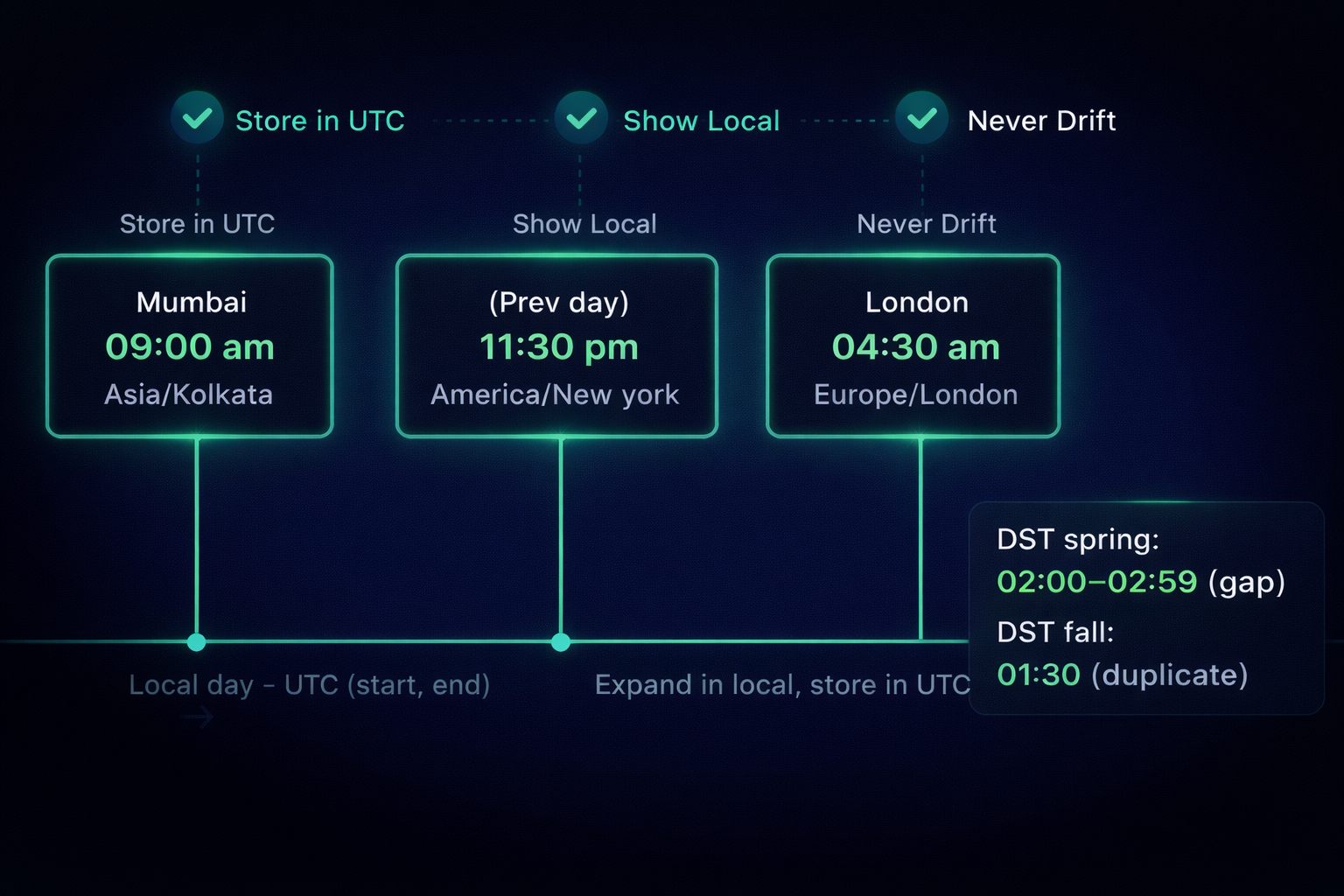
Scheduling across regions looks simple until timezone-aware scheduling meets real users. A doctor sets 9:00 AM Asia/Kolkata; a teammate in America/New_York - part of the same telemedicine team sees midnight; DST rolls in and meetings shift by an hour. These aren’t UI glitches; they’re failures to align UTC (source of truth) with IANA time zones and local wall time.
This guide distills timezone-aware scheduling practices for the Django + React stack into a clear playbook: store instances in UTC, persist the user’s timezone and intent, handle daylight saving time correctly, keep recurring events stable, and filter by local day without surprises. If you’re searching for best practices in timezone handling for web apps, this is your concise, production-ready starting point.
Why Time Zone Scheduling Breaks in Production and How to Fix It
On paper, scheduling across time zones sounds straightforward. In practice, a few invisible forces gang up on you:
- UTC vs what the user meant. Storing the instant in UTC is correct, but users think in local wall time (“daily standup at 9:00 AM”). If you don’t also keep the IANA time zone (e.g., America/New_York) and the intended local time, your timezone-aware scheduling will drift.
- Offsets lie. A numeric offset (GMT+5:30) isn’t a timezone. Multiple regions share the same offset, and some observe daylight saving time (DST) while others don’t. That’s how “works in staging” becomes “why did 9:00 become 10:00?” in production.
- DST creates impossible and duplicate times. In spring, some minutes simply don’t exist (for example, 02:30 in New York on the jump day). In fall, an hour repeats (two distinct 01:30s). If your React time picker and Django backend don’t share a policy, you’ll accept values the server rejects or worse, misinterpret them.
- Recurrence ≠ every 24 hours. “Daily at 09:00” is not “add 24h.” With timezone-aware calendars, expand recurrences in local time first, then convert to UTC, or events will slide during DST changes.
- Filters need local context. “Show me today in Mumbai” is not a plain DB query. The frontend must convert that local day into a UTC range before asking Django, or you’ll miss late-night/early-morning events.
The Production-Ready Model: UTC Truth, IANA Time Zones, and Local Wall Time
To keep timezone-aware scheduling reliable, align these four pieces once, and reuse them everywhere:
- UTC (single source of truth) - Persist the actual instant in UTC for storage, sorting, and jobs.
- IANA time zone (the rulebook) - Store the IANA ID (e.g., Asia/Kolkata, America/New_York) - never a numeric offset.
- Local time (user intent) - Capture what the user chose: local_date and local_time alongside the UTC instant.
- Display context (who’s viewing) - Render with a simple precedence: screen override → profile setting → device/browser.
How it fits together (concise flow):
- User picks local_date, local_time, and an IANA zone.
- Backend validates, converts to UTC (see the Django timezone framework), and saves: starts_at_utc, ends_at_utc, timezone, local_date, local_time.
- On read, convert *_utc to the viewer’s display zone using the precedence rule.
That’s the entire model - UTC for truth, IANA for rules, local fields for intent, precedence for display, and it’s the foundation for the rest of the playbook (policies, recurrence, and filtering) without repeating concepts later.
DST & UX Best Practices for Django + React Scheduling
Great models still fail without clear product rules. Here’s how to make scheduling feel consistent in a Django + React app, especially on DST days.
1) Spring forward (non-existent local times)
On the jump day (e.g., America/New_York), 02:00–02:59 doesn’t exist.
- Policy (strict): Reject the selection with a clear message: “02:30 doesn’t exist today due to DST.”
- Policy (forgiving): Snap forward to the next valid time (e.g., 03:00) and show a non-blocking notice.
- Why: Prevents storing a phantom instant while keeping intent visible.
2) Fall back (duplicate local times)
An hour repeats; 01:30 can refer to two different instants.
- Default: Use the first occurrence.
- Advanced control (toggle): In the React time picker, surface “Earlier 01:30” vs “Later 01:30” when ambiguity is detected. Send the chosen occurrence in the request.
- Why: Keeps UTC unambiguous and avoids hidden shifts.
3) All-day events are local by definition
“All-day” means midnight→midnight in the event’s IANA time zone.
- Compute the UTC window from the local day, then persist starts_at_utc/ends_at_utc.
- Why: Reports and calendar grids stay aligned with what users mean by “today.”
4) Display precedence is consistent everywhere
Apply the same precedence everywhere. (Defined in Production-Ready Model.)
5) Recurrence respects wall time
No 24h drift; expansion is local first (see Recurrence).
6) Filtering by local day
For “today” views, the client queries by a local-day → UTC range (see Filtering Pattern).
7) Messaging and affordances in the UI
- Pre-emptive hinting: If the selected date is a DST change date for the chosen IANA time zone, show a subtle “DST change may affect times” hint near the picker.
- Inline validation: On submit, reflect the exact policy result (rejected vs snapped) in the form, not just a toast.
- Audit visibility: In the event details, display both local wall time and the stored UTC instant for clarity.
These policies turn tricky edge cases into predictable behavior.
Local Day → UTC Range: The Correct Filtering Pattern for Calendar APIs
How it works: The frontend expands a local calendar day (IANA zone) into a UTC half-open range and sends only that to the API.
Client → Server contract
- Input (UI):
date,timezone(IANA). - Client computes UTC window: [
start_utc,end_utc). - Server queries by UTC only - no user-context guessing.
Tiny React/TS utility
import { zonedTimeToUtc } from "date-fns-tz";

export function localDayToUtcRange(localDate: string, iana: string) {
  const startLocal = new Date(`${localDate}T00:00:00`);
  const nextLocal  = new Date(`${localDate}T00:00:00`); nextLocal.setDate(nextLocal.getDate() + 1);
  return {
    start_utc: zonedTimeToUtc(startLocal, iana).toISOString(),
    end_utc:   zonedTimeToUtc(nextLocal,  iana).toISOString()
  };
}
Minimal Django query
qs = Event.objects.filter(starts_at_utc__gte=start_utc, starts_at_utc__lt=end_utc)# or, for calendars: ends_at_utc__gt=start_utc, starts_at_utc__lt=end_utcDecide once (and document)
- Lists/agendas: starts-in-window.
- Grids/timelines: any-overlap.
Edge cases to cover
- DST boundaries: Using the IANA zone ensures the start/end UTC values reflect jumps/repeats. No extra logic needed if you always compute from local midnight and next local midnight.
- All-day events: Compute from the event’s own IANA zone, not the viewer’s. Query with the same UTC window choice as above.
- Cross-zone viewing: The viewer’s time zone does not affect the query; only the filter’s zone matters.
Recurring Events Without Drift: Expand in Local Time, Store in UTC
Principle: Generate each occurrence in local wall time (with an IANA time zone), then convert to UTC for storage and queries. This keeps “daily at 09:00” stable across DST.
Store
- timezone (IANA), local_time (e.g., 09:00:00), optional rrule (iCal), duration_minutes.
- Per occurrence:
starts_at_utc,ends_at_utc.
Expand (deterministic steps)
- Use
rruleto produce candidate local dates in the event’s IANA zone. - Compose
local_date+local_time. - Handle DST:
- Convert to UTC and persist.
Example shapes
- Create series (request):
- Occurrence (response):
{ "starts_at_utc":"2025-11-02T14:00:00Z","ends_at_utc":"2025-11-02T14:45:00Z" }Test matrix
- Daily across DST start: 09:00 local remains 09:00; spring gap handled per policy.
- Daily across DST end: duplicated hour resolved consistently.
- Round-trip check: local → UTC → local equals original (except where policy adjusts).
Why this works
- The user's meaning lives in local time, the system truth lives in UTC.
- No “24h drift,” even on DST boundaries - clean, timezone-aware scheduling for Django + React.
Testing Time Zone Logic: Unit, Playwright E2E, and Property-Based Checks
A reliable scheduling system is test-driven. Keep tests focused, fast, and explicit about IANA time zones, DST, recurrence, and local-day filtering.
1) Unit tests (helpers and validators)
Backend (Django)
- Local → UTC normalization raises on DST edges:
- Local-day → UTC window correctness for multiple zones.
- Recurrence expansion: generated occurrences match expected UTC instants.
Frontend (React)
- Utilities: localDayToUtcRange, display-precedence resolver, formatter round-trips.
Time-picker guards: invalid/ambiguous inputs trigger correct UI policy (block or snap; earlier/later choice).
2) E2E (Playwright) - cross-zone truth
Spin the browser zone; assert the same record renders correctly.
// example: viewer sees Mumbai event from New York
test.use({ timezoneId: 'America/New_York' });

test('renders Mumbai 09:00 correctly in NY', async ({ page }) => {
  await page.goto('/calendar');
  await page.getByRole('button', { name: 'Create' }).click();
  await fillLocalEvent(page, { date: '2025-09-16', time: '09:00', tz: 'Asia/Kolkata' });
  await page.getByRole('button', { name: 'Save' }).click();

  // Expect ~9.5h difference (IST vs EDT); shows 11:30 PM previous day in NY
await expect(page.getByText('11:30 PM')).toBeVisible();
});
Scenarios to cover
- Normal day (no DST), DST start (gap), DST end (repeat).
- Local-day filtering in at least two zones.
- Recurring series across a DST boundary (no drift).
- All-day event shown correctly across zones.
3) Property-based tests (round-trip invariants)
Rule: except where policy adjusts, local → UTC → local equals the original.
Backend pseudo:
@given(zone=iana_zones(), dt=valid_local_datetimes())
def test_round_trip(zone, dt):
    aware_local = make_policy_aware(dt, zone)  # apply spring/fall policy
    utc = aware_local.astimezone(ZoneInfo('UTC'))
    back = utc.astimezone(ZoneInfo(zone))
    assert same_wall_time(back, aware_local)  # hour/minute equality
4) Minimal test matrix
| Case | Zone | Input | Expect |
| Normal convert | Asia/Kolkata | 2025-09-16 09:00 | stores 03:30Z; renders 09:00 IST |
| Spring forward gap | America/New_York | 2025-03-09 02:30 | reject or snap→03:00 per policy |
| Fall back repeat | America/New_York | 2025-11-02 01:30 | first occurrence by default (or explicit later) |
| Local-day filter | Asia/Kolkata (2025-09-16) | local day | [2025-09-15T18:30Z, 2025-09-16T18:30Z) |
| Daily recurrence across DST | America/New_York 09:00 | series | every occurrence is 09:00 local, UTC varies |
5) CI tips
- Run unit tests in UTC; E2E with explicit
timezoneIdvalues. - Seed tzdata (IANA) in test containers to avoid host drift.
- Snapshot responses include both UTC and intent fields (IANA, local_date, local_time).
This suite locks correctness for Django + React across DST, IANA time zones, recurrence, and local-day filtering, and prevents regressions as libraries or rules change.
Observability for Time Zones: Logs, Metrics, and a Fast-Acting Runbook
Make timezone-aware scheduling auditable. Log intent, measure edge cases, and keep a small runbook so on-call can fix issues fast.
What to Log on Create/Update
- Truth:
starts_at_utc,ends_at_utc - Intent:
timezone(IANA),local_date,local_time,rrule?,duration_minutes? - Policy outcomes:
dst_policy_applied(rejected|snapped|unambiguous) - Viewer/display zone at render points (for tricky support tickets)
Client metadata:
app version, library (Temporal/Luxon/date-fns-tz)
Metrics to Track
events_created_total,events_updated_totaltz_non_existent_local_time_total(spring-forward rejects)tz_ambiguous_local_time_total(fall-back choices)tz_snaps_applied_total(auto-adjusts you made)recurrence_expansion_fail_total(bad rrules / invalid instances)filter_queries_by_zone_total{zone=…} (helps capacity planning)
Essential Dashboards
- Quality panel: rate of rejects/ambiguous per IANA zone; spike alerts around DST weeks.
- Latency panel: time to expand recurrence; read/query times for [
start_utc,end_utc) searches.
Usage panel:
events per zone, top zones by filters, top recurrence types.
Actionable, Low-Noise Alerts
- High
tz_non_existent_local_time_totalortz_ambiguous_local_time_totalin the last 1h. - Error rate on create/update API > threshold.
- Recurrence expansion latency p95 above SLO.
Runbook Template
- Identify report: user says “time shifted” or “event missing.”
- Check logs: find
event_id→ compare intent vs UTC; verifytimezoneis IANA, not offset. - Validate policy: was it a DST day? Look for
dst_policy_applied. - Reproduce: render the same record in the user’s display zone; confirm with local-day → UTC filter.
- Fixes:
Operational Hygiene
- Pin tzdata: keep servers/test containers on a known tzdata version; schedule periodic updates.
- Feature flags: ship DST policies (reject vs snap) behind flags for safe rollout.
- Backfills: job to regenerate occurrences for a series if policy/zone changes.
- Indexing: keep
starts_at_utc,ends_at_utcindexed; consider composite indices for heavy reporting. - Exports: include both UTC and intent fields in CSV/BI to avoid misreads downstream. For a broader look at how we approach backend architecture and reliability in production, see Procedure’s Backend Engineering.
This lightweight observability layer makes time zone handling in web apps debuggable and keeps your Django + React scheduling predictable, even on DST weeks.
Conclusion: Ship Time That Users Can Trust
Time doesn’t break systems; assumptions do. When we stopped treating “9:00 AM” as a number and started treating it as intent-bound to an IANA time zone, everything fell into place. Store the truth in UTC, keep the intent as local fields, render with a single precedence rule, expand recurrence in local time, and always filter by local day → UTC range. That’s the backbone of reliable, timezone-aware scheduling in Django + React.
If you’re an early-stage engineer, you don’t need exotic abstractions, just consistent ones. Adopt the model once, codify your DST policies, write a few focused tests, and wire in lightweight observability. The payoff is immediate: fewer “why did this shift?” tickets, predictable calendars across regions, and a codebase that won’t flinch when clocks jump or repeat.
Use this playbook as your baseline. Start small - one model, one filter utility, one recurrence helper, and iterate. Software changes; time rules change too. With the right foundations, your product won’t.
If you found this post valuable, I’d love to hear your thoughts. Let’s connect and continue the conversation on LinkedIn.
Brajkishor Baheti
CEO
Brajkishor (Braj) Baheti is the Co-Founder of Procedure Technologies, where he builds scalable systems -products, processes, and platforms that make complexity invisible. A Chartered Accountant by training, and a former risk advisor at EY and quant developer in capital markets, Braj brings deep financial context, structural thinking, and execution rigor to every system he builds. He has led teams across finance, education, healthcare, and operations, delivering enterprise software trusted for critical workflows. He also invests in early-stage startups as a Partner at Windrose Capital and still writes code when it matters.